
Business phone appYour business line, in your pocket and on your desk.
Call and text from your business number on iOS, Android, Mac, Windows or any browser. Customers see one consistent number; you get every call and text logged — wherever you took it.
One number, every device
Can I use my business phone number on my mobile?
Yes. With the TalkerIQ mobile app you make and receive calls and texts on your business number from your own phone, without revealing your personal number. The same number also rings on the desktop app and browser softphone.
- Platforms
- iOS, Android, macOS, Windows, browser
- Caller ID
- Your business number, never your personal one
- Texting
- SMS and MMS from the business number
- Rings
- On all devices at once; answer on one
- Off hours
- Do-not-disturb hands calls to teammates or AI
- Logged
- Calls, texts, notes and recordings to the CRM
Sound familiar?
Half the team works from job sites. They were using personal phones, and nothing made it back to the CRM.
Personal numbers on business calls
Customers save a rep's personal number and the relationship walks out the door with them.
Calls from the road go unlogged
No recording, no notes, no CRM entry — it's as if the call never happened.
Tied to a desk
Desk phones don't work at home, in the field or at the airport.
How it works
How do you set up the TalkerIQ apps? Once — then answer anywhere.
Install and sign in
Download the app, sign in with your TalkerIQ account and your numbers appear.
You · 2 minutesRing everywhere at once
Calls ring on browser, desktop and mobile together. Answer on one; the others stop.
AutomaticCall and text as the business
Outbound calls and texts show your business number, never your personal one.
Your teamEverything syncs
Recordings, texts, notes and outcomes land in the same history and your CRM.
Automatic
At your desk
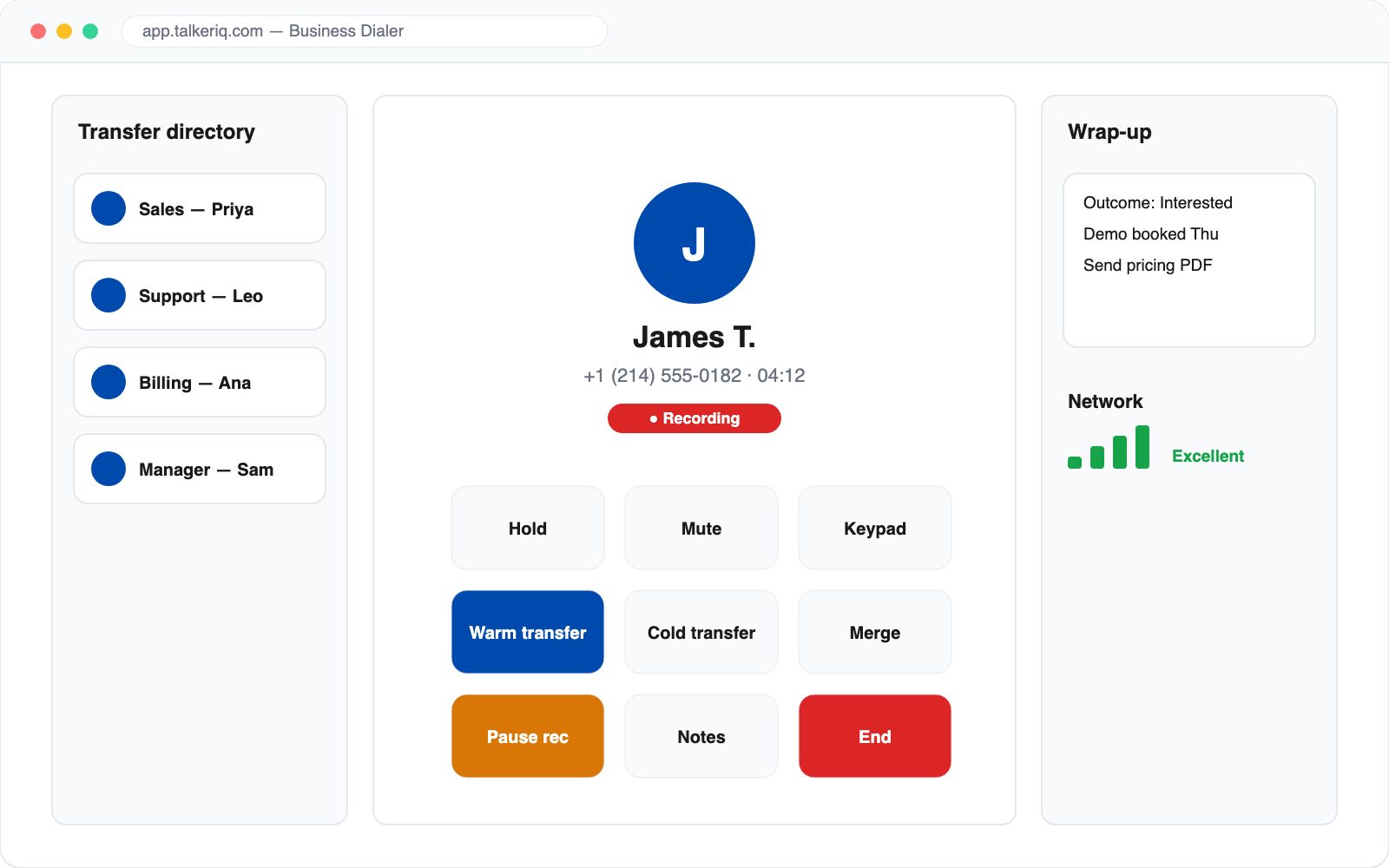
A full softphone in the browser or desktop app.
Hold, transfer, merge, record and take notes — with the caller's history on screen before you say hello.
- Warm and cold transfer to people or AI
- Recording with pause for sensitive data
- Wrap-up notes that log to the contact
On the move
Mobile that respects your personal time.
Set availability so business calls go to teammates or the AI agent when you're off — your personal number stays private either way.
- Availability and do-not-disturb
- Business texting from your phone
- Push notifications for missed calls and new texts
Team inbox · (512) 555-0187
Can I move my install to Saturday?
Maria · openWhat's the price for the 3-zone unit?
AI handlingThanks, see you Tuesday!
ResolvedWhat changes
What changes when your phone system travels with you?
number to customers
The business number, from every device.
call logged
Even the ones taken in a parking lot.
personal numbers
Never shared with customers again.
A day with TalkerIQ
A field technician's day — business line in his pocket.
Marco runs installs for a home-services company and is rarely at a desk.
- Texts the first customer
Sends an on-my-way text from the business number in the mobile app; the reply lands in the team inbox too.
- Customer calls the office line
The office ring group includes Marco; he answers on his phone and the customer sees the business number.
- Hands off to the office
Uses warm transfer to pass a billing question to the office manager on her desktop app.
- Off the clock
Marco sets do-not-disturb; evening calls go to an AI receptionist that books tomorrow's jobs.
Compare
Business phone app vs using your personal number
| Personal number | TalkerIQ app | |
|---|---|---|
| Customer sees | Your personal number | The business number |
| Calls and texts logged | No | Yes, to the CRM |
| Hand off to a teammate | Give out another number | Warm or cold transfer |
| When you leave the company | Customers leave with you | Number and history stay |
| Off-hours coverage | Voicemail | Teammates or AI agent |
FAQ
Questions about the apps
Still unsure? Talk to our team.
Reviewed by the TalkerIQ product team · Updated
Which devices are supported?
TalkerIQ runs in modern web browsers and has apps for iOS, Android, macOS and Windows.
Does my personal number show when I call from the app?
No. Calls and texts from the app show your TalkerIQ business number.
Can I text from the mobile app?
Yes. Send and receive SMS and MMS on your business number, with threads shared with your team inbox where configured.
What happens when I'm off the clock?
Set yourself unavailable and calls follow your routing rules — to a teammate, a queue or an AI agent.
Are calls from the app recorded and logged?
Yes, according to your recording settings. Calls, texts and notes from the app join the same history and CRM sync as everything else.
Does the mobile app use my phone minutes or data?
Calls in the TalkerIQ app run over Wi-Fi or mobile data, like other internet calling apps. They don't use your carrier's voice minutes.
Can I use one business number on several devices?
Yes. The same number can ring on your browser, desktop app and mobile app at the same time; when you answer on one, the others stop ringing.
Is the mobile app included in every plan?
Yes. The browser softphone, desktop apps and mobile apps are part of TalkerIQ on every plan, starting at $29 per user per month billed annually.
Keep exploring
Take your business line anywhere.
Book a walkthrough and see the same call ring on browser, desktop and mobile.