
Drag call, SMS, wait, and condition steps onto a canvas, branch on what each lead does, preview exactly when every touch will fire — and launch with a checklist that catches mistakes before your leads see them.
Every capability you need to go from idea to a running multi-channel campaign
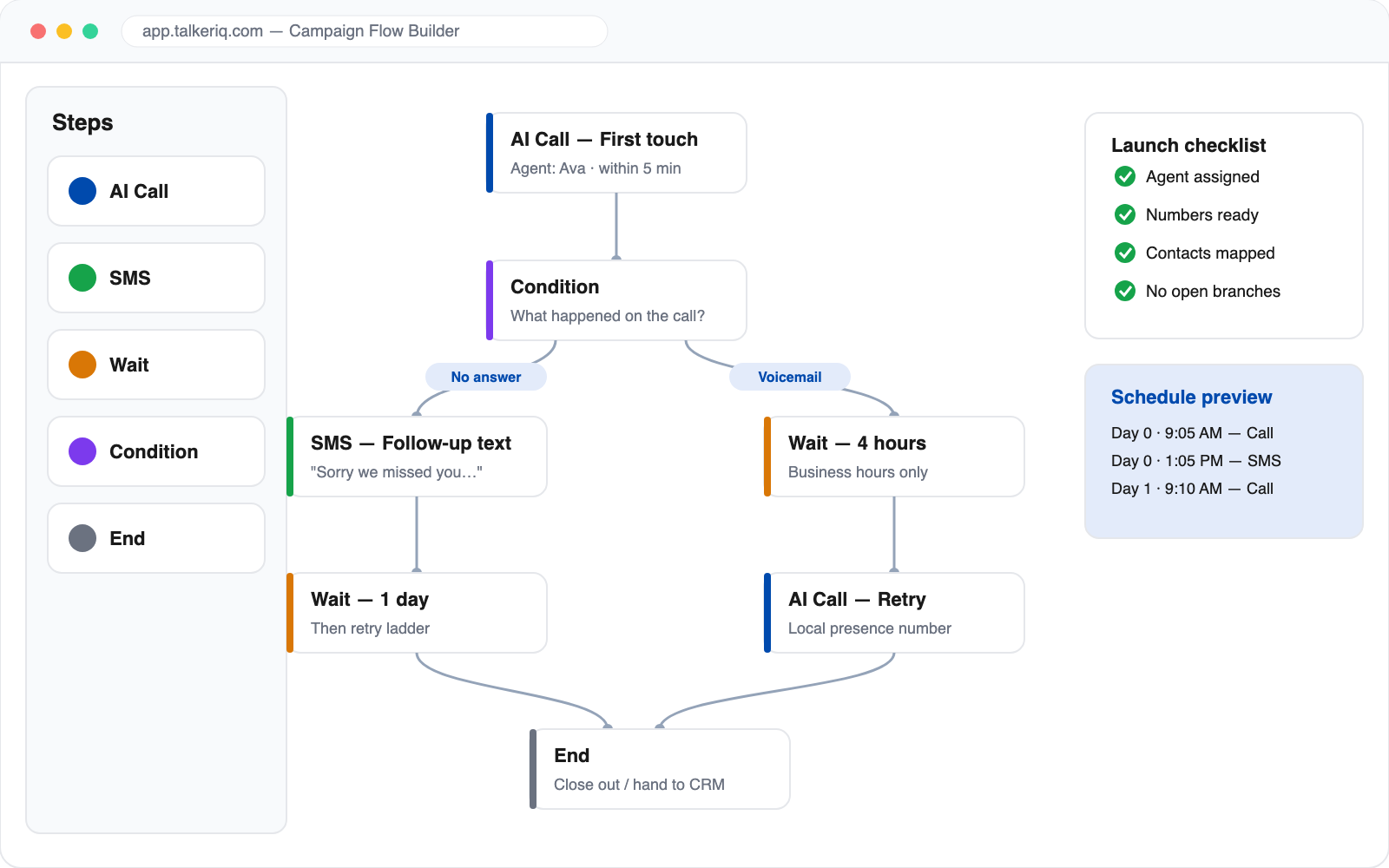
Call, SMS, wait, and condition nodes snap together on the canvas. Reorder, branch, and rewire a sequence in seconds — no scripts, no spreadsheets.
Send leads down different paths depending on what actually happened: answered, voicemail, no answer, replied to a text, or opted out. Every branch is explicit and visible.
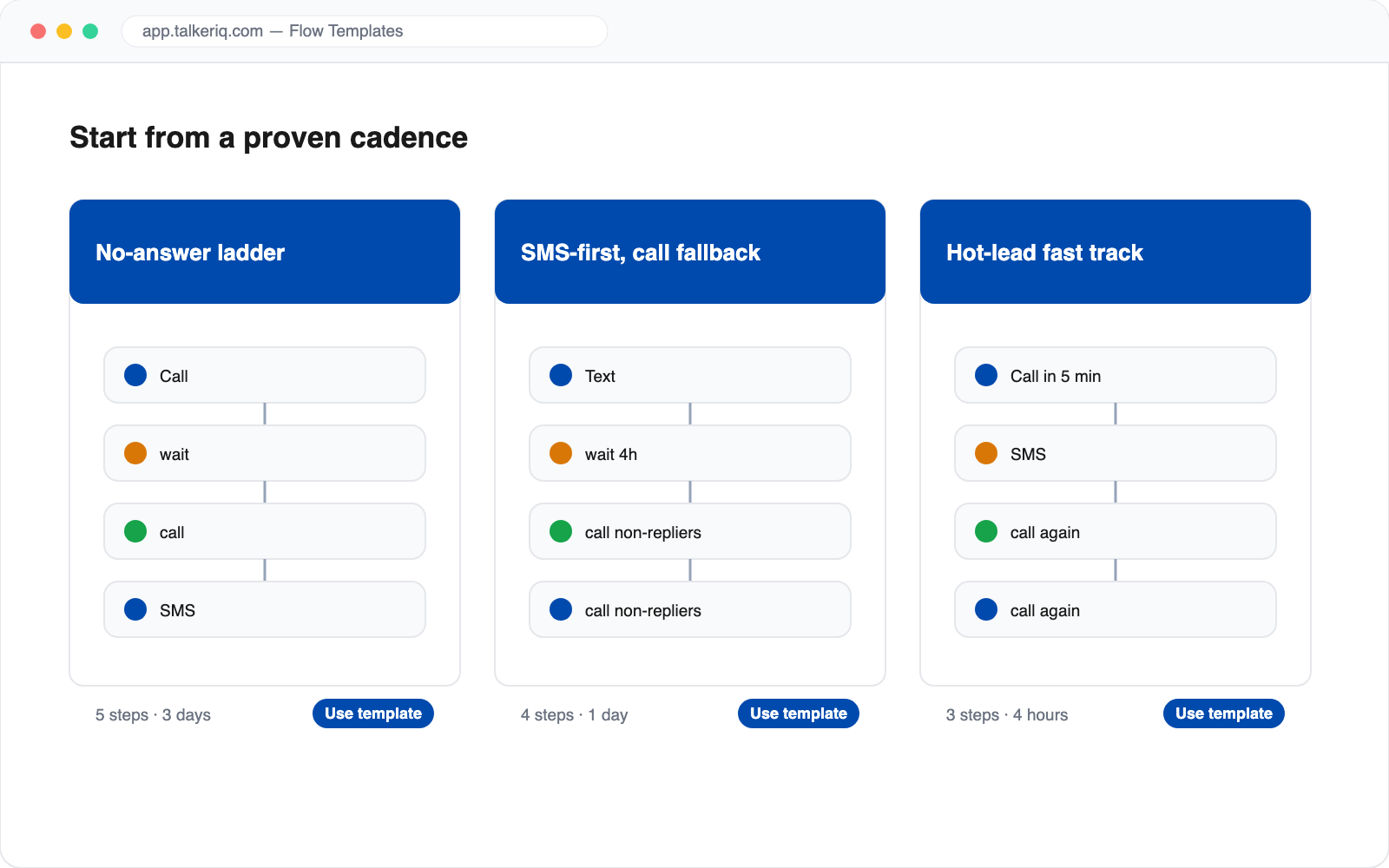
Start from proven cadences like the "No-answer ladder," "SMS-first with call fallback," or "Hot-lead fast track" — then tweak them to match your playbook.
Before launching, see a timeline of exactly when each step will reach a lead — respecting business hours, time zones, and your wait steps. No surprises at 6 a.m.
The builder checks your flow for dead ends, loops, and ambiguous branches, and a launch checklist confirms agents, numbers, and contacts are ready before anything goes live.
Describe your cadence in plain English and let Spark, the AI campaign copilot, draft the flow for you — then fine-tune it visually.
Every step in a TalkerIQ flow can be a voice call handled by your AI agent or a text message — and conditions can route between them. A common pattern: text first, wait four hours, call anyone who hasn't replied, and if the call hits voicemail, follow up with a second text. The SMS AI agent handles replies that come back mid-sequence.
The flow reacts. A reply, a booked appointment, or an opt-out immediately reroutes that lead — pausing further outreach, jumping to a "hot lead" branch, or closing them out. You can watch each contact's exact journey step-by-step in the campaign's sequence timeline, and dig into results in campaign analytics.
Three steps to a running multi-channel sequence
Flows are built from AI call steps, SMS steps, wait steps, condition (branch) steps, and end steps. Conditions route leads based on real outcomes such as answered, no answer, voicemail, replied, or opted out.
No. The builder is fully visual — drag steps, connect them, and configure each one in a side panel. If you'd rather not build at all, describe your cadence in plain English and the Spark copilot drafts the flow for you.
Yes. The schedule preview shows a concrete timeline of every planned touch, factoring in your wait steps, business hours, and campaign start time, so you can verify the cadence before a single call is placed.
Validation flags loops, unreachable steps, dead ends, and ambiguous branches where a lead could match two paths at once. The launch checklist then confirms an agent, phone number, and contact list are attached before the campaign can start.
Yes. TalkerIQ ships with proven cadence templates — including a no-answer retry ladder, an SMS-first sequence with call fallback, and a hot-lead fast track — that you can use as-is or customize.
You can pause a campaign, adjust the flow, and rerun or reschedule pending steps. Each contact's position in the sequence is tracked individually, so changes apply cleanly.